Retro gamers can save over 50% on mClassic graphics enhancement program from Marcel. Usually 100 dollars mClassic Retro edition is on sale for just $45.15, the best price ever for HDMI accessories. The Retro Edition is designed for gamers who want to enhance the visual experience of legacy games originally designed for 4:3 displays when played on modern HD and 4K TVs.
The Retro Edition is one of three different mClassic models produced by Marseille. It was launched in 2025 along with mClassic Switch Editionwhich is reduced to $74.25 (was $100). mClassic Switch Edition is designed to improve graphics on Switch and other widescreen platforms such as Steam Deck, Wii, Xbox 360 and PS3. Retro and Switch editions have one of the enhancement modes available in mClassic, original editionwhich currently costs $89 (was $100) and also offers two new visual modes aimed at retro gaming or Switch/Steam Deck, depending on which model you choose.
Below we will take a closer look at all three options.
$45.15 (was $100)
mClassic Retro Edition has three different modes designed for consoles released before the high definition era. If you're buying mClassic to play on the SNES, GameCube, PlayStation 2, Sega Genesis, Nintendo 64, or any other console designed for a 4:3 aspect ratio, you should choose the Retro Edition.
It has three modes that you can switch between:
- Retro mode: Display games in their original 4:3 aspect ratio with increased resolution.
- Vintage mode: Reproduces the picture and sound of a CRT TV in 4:3 format. This mode does not change colors, lighting or sound as it focuses on authenticity.
- Vintage Upgrade Mode: A blend of Retro and Vintage modes that strike a balance between authenticity and enhanced visual fidelity.
Note: For game consoles without an HDMI port, such as GameCube, SNES and N64, you will need adapter like one of these $20-$30 models from Amazon.
$74.25 (was $100)

Note: This will not provide any benefit when using the Nintendo Switch 2.
mClassic Switch Edition is aimed exclusively at modern gaming platforms with a widescreen aspect ratio (16:9). When it comes to modern HD consoles, Marcel has always focused the mClassic on the Switch, which is why the name of the new model uses the Nintendo console. But the mClassic Switch Edition can be used with Steam Deck, PS3, Xbox 360 and other devices with widescreen aspect ratios that lack 1440p and/or 4K resolution.
Again, performance on Switch varies by game, but the mClassic Switch Edition is capable of upscaling to 1440p at 60fps.
In mClassic Switch Edition you can switch between three different visual modes:
- Improvement included: This mode offers all the same benefits as the “Enhancement On” mode in the original mClassic.
- Switch Plus: Recreates the Switch's handheld mode while gaming on your TV. If you think Switch games look better in handheld mode—and you're not alone in that belief—this mode may be preferable to the original enhancement mode.
- Switch enhancement mode: This mode aims to provide some of the key benefits of OLED TVs, namely improved contrast and clarity when displaying dark colors.
$89 (was $100)
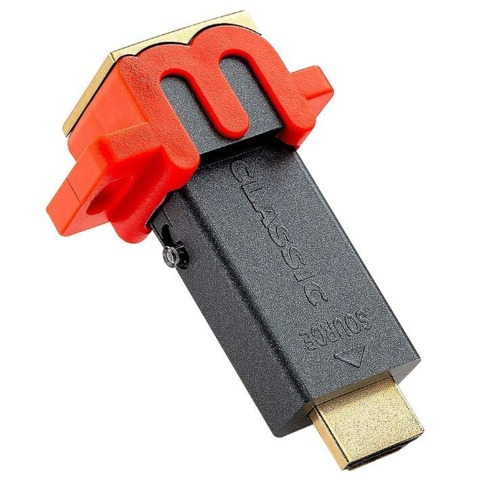
The original mClassic Graphics Upscaler offers a combination of two recently released special editions. It has features and modes designed for 16:9 (widescreen) games, as well as technologies designed to improve the image quality and performance of retro games designed for 4:3 TVs.
mClassic offers noticeable visual improvements, although the extent to which you'll notice the differences depends on how discerning you are when it comes to graphics. Switch games can be upscaled to 1440p at 60fps. It has built-in anti-aliasing technology that smoothes out jagged edges and sharpens images. In our experience, the exact increase in visual fidelity depends on the game.
On consoles with HDMI, such as the Switch, PS3, and Xbox 360 (except first generation 360 consoles), all you have to do is plug the console into the console, plug in the included power cable, and then plug the HDMI cable from your TV back into the mClassic dongle.
mClassic dramatically improves the overall picture quality and playability of pre-HD era gaming consoles – Super Nintendo, N64, GameCube, etc. – on today's 4K and HD flat screen TVs. A CRT TV is still the best option for retro gaming, but the mClassic is a great option for those who don't want to deal with a bulky box TV or the hassle of finding one in general.
There is a switch on the key to switch between modern and retro modes. The third “mode” of the original mClassic simply disables the device's GPU.
- Improvement included: Improves visuals and performance on widescreen platforms, including Nintendo Switch and Steam Deck.
- Retro mode: Allows you to play retro games with a 4:3 aspect ratio on modern displays. Significantly improves image quality in games originally designed for CRT TVs.
Note: Game consoles without an HDMI port, such as the aforementioned retro Nintendo consoles, require the mClassic to be connected to an adapter, e.g. one of these $20-$30 adapters for GameCube, N64 and SNES.
Marcel recommends locking your Nintendo Switch at 720p when docked—the resolution for handheld mode—for best results. Based on our testing, we agree with this recommendation, but be sure to re-enable 1080p resolution before playing without mClassic Original or mClassic Switch.
If you're worried about increased latency due to the HDMI cable running through the dongle, we didn't notice that. Marcel claims the device adds an average of 0.2ms in that direction, but you'd probably have to be a cyborg to notice that. mClassic also supports lossless audio transmission.
Keep in mind that you'll also need to play on a 1440p or 4K-capable TV or monitor to take full advantage of mClassic. However, if you're playing on a 1080p panel, mClassic still provides an improvement in image quality.